Bitcoin Core is the first wallet software ever created. It was developed by the creator of Bitcoin itself, Satoshi Nakamoto, and was released in 2009. It still exists today, but many people prefer other wallet applications that are easier and more convenient to use.
If you bought Bitcoins in the very first years of its existence, you may have used Bitcoin Core to store your coins. However, if it has been a long time since you last accessed your Bitcoins, you may not even know where the wallet is stored on your computer.
If you are wondering how to find your Bitcoin Core wallet, you can scan your computer for it with an application called Treasure Hunter.
How to automatically scan your computer for Bitcoin Core wallets
The most reliable way to find a Bitcoin Core wallet file is to use software built for this job. Treasure Hunter can inspect the contents of every file on your computer to determine if it’s a Bitcoin Core wallet. Thanks to its advanced detection techniques, it can recognize wallet files even if they have been renamed, buried in an archive, or partially corrupted.
Download Treasure Hunter for free
The free version of Treasure Hunter comes with a LITE license. It detects all Bitcoin Core wallet files, from the oldest ones in Berkeley DB format to the most recent ones in SQLite 3 format, password-protected or not. No results are withheld, though some file paths may be masked. The LITE license covers 10 scans on your own private devices and does not permit commercial use. Consider upgrading your license if needed.
Download the version that matches your operating system in the table below. The executables for the Windows and Mac versions are digitally signed for your security.
| System | Download (64-bit) | Download (32-bit) | Requirements |
|---|---|---|---|
| Windows | Download (64-bit) | Download (32-bit) | Windows 7, 8, 8.1, 10, or 11 |
| Mac | Download (64-bit) | – | – |
| Linux | Download (64-bit) | Download (32-bit) | GTK 2 and OpenSSL 1.x or 3.x |
How to use Treasure Hunter
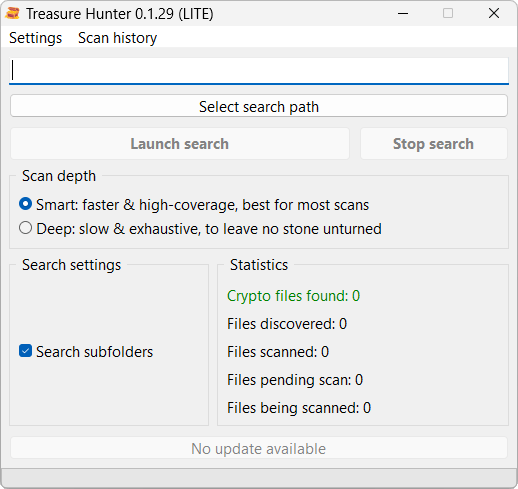
Once you have downloaded the software, open it. You will see the following window:
-
Click Select search path.
-
Select the drive you would like to scan.
-
Select your scan depth.
-
The smart scan is best for standard, healthy drives. It is faster and handles most scenarios perfectly.
-
The deep scan is best for complex cases. Use this option when:
-
You believe the Bitcoin Core wallet files were intentionally hidden.
-
You are scanning a reformatted, wiped, or damaged drive that was restored with data recovery software (like Disk Drill, DMDE, or R-Studio). Follow this in-depth tutorial for more details on how to scan such a drive.
-
-
-
Click Launch search to begin the analysis.
Treasure Hunter will scan the selected path for Bitcoin Core wallets. This may take several hours to complete. Please be patient and allow the software to finish its work. Once it is done, it will let you know if any Bitcoin Core wallets have been detected.
The manual way
If you would rather not download any software, you can search for Bitcoin Core wallet files yourself. Just be aware that a manual search is more error-prone, and you may walk away empty-handed from a computer that does hold a wallet. This can happen if your wallet file was renamed to something inconspicuous, or if it has been corrupted somehow.
The most popular approach when searching for a Bitcoin Core wallet file manually is to look for a file named wallet.dat
on your computer. Depending on your operating system, it is normally found in the folders below, either directly or in
a wallets subfolder.
| System | Paths |
|---|---|
| Windows | C:\Users\<username>\AppData\Roaming\Bitcoin or C:\Documents and Settings\<username>\Application Data\Bitcoin |
| Mac | /Users/<username>/Library/Application Support/Bitcoin |
| Linux | /home/<username>/.bitcoin |
If you do not find any wallet.dat file in the locations above, scan your entire computer for it using your operating
system’s search function. Be sure to check any other storage devices you may have used, including external or backup drives.
What to do if you find a Bitcoin Core wallet file
Before you do anything else, make a copy of the wallet file and store it somewhere safe. Never experiment with the original file, as it may be silently upgraded, re-encrypted, or overwritten by Bitcoin Core. A single botched attempt can destroy the file for good. Once you have your copy, try to open it with Bitcoin Core.
If you are lucky, Bitcoin Core will give you direct access to your funds or ask you for a password you already know. If you are less lucky, you may face hurdles; the two most common issues are listed below.
Bitcoin Core asks for a password you no longer remember
You’ll need to use password-cracking software like hashcat, John the Ripper, or BTCRecover. These tools accelerate recovery by testing millions of passwords automatically. However, they aren’t magic. They work much, much better if you can recall parts of your password, as Bitcoin Core wallet files are well-protected against brute-force attacks. If that fails, search your storage devices for an older version of the wallet file; occasionally, backup software saves copies that are not password-protected.
Bitcoin Core claims your wallet file is invalid
There are two common explanations when you get error messages such as:
wallet.dat corrupt, salvage failedWallet file verification failedError unlocking wallet: some keys decrypt but not all
The first explanation is that your wallet file may have been created by an older version of Bitcoin Core and you are attempting to open it with a newer release. This does not always work. Bitcoin Core has undergone many changes over the years, including switching from Berkeley DB to SQLite 3 for wallet storage. The solution is simple: try opening your wallet file with older versions of the software. You may need to test several versions before finding one that is compatible with your file.
The second explanation is that your wallet file is corrupted. This is likely if the wallet file was retrieved with data
recovery software. The easiest solution is to search your storage devices for another, intact copy of the wallet file.
If that fails, you may need to repair the wallet file or extract its private keys. Tools such as PyWallet and Bitcoin
Core’s -salvagewallet and salvage commands may help, but they require significant technical expertise and fall
outside this article’s scope.