You have probably heard of James Howells. In 2013, he threw away a hard drive containing the private keys to 8,000 Bitcoins, and he spent the following twelve years trying to dig it back out of a Welsh landfill. It is the most famous story of lost cryptocurrency ever told, and it is usually presented as a freak accident: a spectacular, one-in-a-million blunder.
However, as a cryptocurrency expert, I believe that his story is neither unique nor over. In fact, a quieter version of it is likely playing out right now, in basements and recycling depots, and the people involved might not even know about it.
The story of James Howells
The saga has been retold for over a decade, so here is the short version.
In 2009, Howells mined 8,000 BTC on a laptop. He kept its hard drive in a drawer, then in 2013 mistook it for another one and threw it out. What followed was twelve years of trying to get it back. Newport City Council refused to let him excavate, citing its environmental permit and the hazards of digging through a landfill. He assembled expert teams, secured funding, proposed AI-assisted searches, and offered the council a cut of the proceeds. The council did not go for it.
Howells sued for access or compensation, and in January 2025 a High Court judge struck the claim out for having no realistic prospect of success. His appeal was refused weeks later. His offer to buy the landfill outright went unanswered, while the council scheduled the site for closure and capping. By early 2026, he had stepped back. The drive is still down there, most likely destroyed by now.
While his story is tragic, an important lesson can be drawn from it: you, the reader, should always check your storage devices – all of them: HDDs, SSDs, USB keys, SD cards, etc. – before getting rid of them. I believe many people are throwing away Bitcoins they never knew they had. We don’t hear about them because the amounts involved are too small to make the news.
The solution: Treasure Hunter
What if you do want to search your drive before throwing it away? How should it be done?
The standard approach is to search your drive for known filenames like wallet.dat. That works fine until reality gets in
the way. Wallet files get renamed. They get moved into a folder of vacation photos or buried inside an old backup archive.
Sometimes they are hidden on purpose, to keep them away from prying eyes. A seed phrase might be sitting in a text file
called notes.txt, or in an email export, or in a screenshot. And when a drive holds millions of files, searching through
it by hand is not realistic.
That is why I built Treasure Hunter.
Treasure Hunter automates this search by inspecting the contents of every file to determine whether it holds cryptocurrency data. It recognizes the signatures of dozens of wallet formats – Bitcoin Core, Electrum, Multibit, Armory, Blockchain.com, Exodus, MetaMask, and many others – as well as secrets such as WIF keys, BIP39 seed phrases, HD master keys, and mini private keys. It uncovers wallet files even when they have been renamed, moved, or hidden.
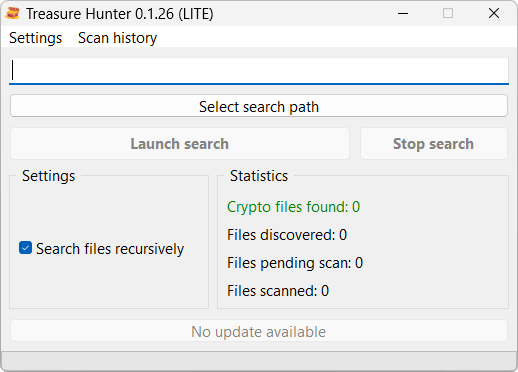
How to scan a drive before you throw it away
Treasure Hunter runs on Windows, Mac, and Linux. It comes with a free LITE license, so checking a drive costs you nothing but time. It does not require an Internet connection either, meaning you can run it on a fully offline computer if that’s what you prefer.
Below are the instructions to scan your drive.
-
Connect the drive you are about to throw away.
-
Open Treasure Hunter and click Select search path.
-
Select the drive you would like to scan.
-
Click Launch search to begin the analysis. Depending on the size of the drive and the number of files it holds, this may take several hours. Please be patient and allow the software to finish its work.
-
Review the results. Treasure Hunter indicates which patterns triggered each match, so you know what file you are looking at and which software created it.
Finally, keep in mind that locating a wallet file and accessing the funds inside it are two separate tasks. The first one takes an evening. The second one can take anything from five minutes to a password-cracking campaign, and if you get stuck there, I do offer professional crypto-recovery services.
Final thoughts
James Howells will most likely never see his 8,000 coins again. His drive is buried under a capped landfill, probably corroded beyond repair, and protected by a decade of court rulings and environmental permits. That chance is gone.
Your old drive is a different story. It is still in your house, it is still readable, and nobody needs a court order to look at it. All it needs is one scan before it leaves your hands, because the trip to the recycling depot only goes one way.