If you’ve found your way to this article, you’re probably in a frustrating spot. Maybe you have a Bitcoin wallet file, but you can’t get into it because you’ve forgotten or lost the password that protects it. Perhaps you’re holding a partial secret, such as a WIF key with several characters you can’t make out, or a seed phrase that’s missing a few words. Either way, your coins are right there, and yet you can’t touch them.
The conventional wisdom: password cracking
When people get stuck here, the standard advice is to reach for password-cracking tools such as hashcat, John the Ripper (JtR), or BTCRecover. The idea is that you feed the tool your encrypted wallet file (or your partial key), and it systematically tries combinations until it lands on the right one. Each tool comes with different attack modes to narrow the search and improve your odds of success.
This is good advice, and cracking should usually be your first move. However, it often fails, and it’s worth understanding why:
-
Your password is too complex. A long, random password can push the keyspace far beyond what any realistic amount of computing power can chew through in a human lifetime.
-
You can’t recall enough of your password. Cracking tools shine when you can feed them constraints through masks, rules, and wordlists. If you truly have no memory of the password, you’re brute-forcing blind, your keyspace is effectively unbounded, and your chances of recovery plummet.
-
Your wallet is built against cracking tools. Many wallet formats deliberately rely on key-derivation functions (KDFs) – such as scrypt or PBKDF2 – that are engineered to be slow. An attack that would take days against a fast hash (such as MD5 or SHA256) could stretch into centuries here.
The same problem shows up with partial secrets. If a WIF key is missing more than a couple of characters, or a seed phrase is short by too many words, the number of valid combinations you’d have to test can explode far beyond what’s practical.
A different approach: stop cracking, start searching
When people hit this wall, most of them assume they’re out of options. However, there’s another path that’s often overlooked, and it has nothing to do with breaking encryption. Here’s the idea: somewhere across all of your storage devices, there may be an unencrypted copy of your wallet, or a plain, complete copy of the secret itself. If such a copy exists, you bypass the need to crack anything.
I know how this sounds. If you were careful enough to encrypt your wallet, why would an unprotected version be lying around? The answer is that you may have been careful, but your computer may not have been. Operating systems and software are relentless copy-makers. Your wallet or secret may have quietly ended up in places you never intended:
-
Temporary files, application caches, or debug logs created while your wallet software was open.
-
Automatic backups made by your wallet software, your operating system, or a third-party backup tool.
-
Swap, page, and hibernation files, or crash dumps, where the system writes chunks of memory to disk.
-
Cloud-synced folders from services such as Dropbox, iCloud Drive, or OneDrive, which can replicate files across many devices.
This is admittedly a long shot, but it’s not as unrealistic as it sounds. In fact, it’s how I once recovered a client’s Bitcoins. I had spent a great deal of effort trying to crack their wallet file’s password, and I simply couldn’t do it. So I changed tactics and combed through the dozens of backup drives they had accumulated over the years – they were terrified of losing data. Sure enough, one of those drives held an unencrypted copy of their wallet file. From a security standpoint, that’s a frightening thing to leave lying around. In their case, though, it was their salvation.
How to search your devices with Treasure Hunter
In theory, you could comb through your drives by hand, but I don’t recommend it. A plain copy of your secret, or of an unencrypted wallet file, could be tucked in a forgotten folder, mislabeled beyond recognition, or corrupted just enough to slip past a manual search. This is precisely the kind of job I built Treasure Hunter for: it inspects the actual contents of every file, so it can spot private keys, seed phrases, and wallet files even when they’re hidden or obscured.
The key here is thoroughness: scan every device you own, not just your main computer. External hard drives, old USB keys, SD cards, burned CDs and DVDs, retired laptops – any of them could be holding the copy you need.
Once you have downloaded the software, open it. You will see the following window:
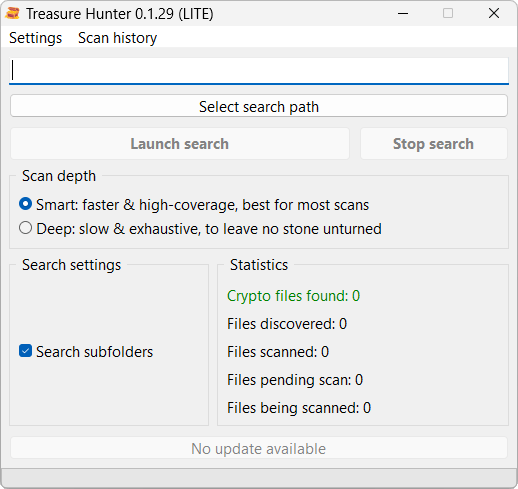
The process is then straightforward:
- Click Select search path and choose the drive you want to scan.
- Select your scan depth (more on this below).
- Click Launch search.
Choosing between a smart scan and a deep scan
Treasure Hunter offers two scan depths, and picking the right one matters:
-
The smart scan is the right choice for standard, healthy drives. It’s faster and handles the vast majority of cases perfectly. If the drive still works normally, start here.
-
The deep scan is for tougher situations, for instance when you suspect a file was intentionally hidden, or when you’re dealing with a drive that has been reformatted, wiped, or damaged. Keep in mind that a wiped or reformatted drive can’t be scanned as-is: you first need to use data recovery software such as Disk Drill or DMDE to reconstruct its filesystem, and only then point Treasure Hunter at the result with a deep scan.
Depending on the size and speed of your device, a scan can take several hours. Be patient and let it finish.