As a cryptocurrency expert, I’m sometimes contacted by people because they own old hard drives or computers and want to know if they contain any Bitcoin wallets. Since these devices can easily hold millions of files, combing through them can be a daunting task. You may wonder if it’s even possible to efficiently search an old hard drive for Bitcoins. The short answer is yes! This can be done with an application called Treasure Hunter.
How Bitcoins are stored
Technically speaking, the Bitcoins themselves are not stored on your hard drive. Instead, what your computer actually holds
is a secret, or a piece of data that authorizes you to move the associated funds by proving you are their rightful owner.
This secret typically takes the form of a private key (such as L5H5zfYPno3QEB9Ng5jhiAUpKyLRG11nxST4s8hjQkLqKPZPgfiZ)
or a seed phrase (such as gesture salt involve release begin churn mesh claw correct false capable right), and
it is stored within a file on your hard drive.
To find Bitcoins, you need to search your computer for a file that contains one of these secrets. Throughout this guide, I will refer to these files as wallet files. The main way to find them is through automated scan tools such as Treasure Hunter, though I will also cover a manual method later on.
How to automatically search an old hard drive for Bitcoins
The best way to find old Bitcoin wallets is to use an application built for that purpose. I recommend Treasure Hunter: this powerful software inspects the contents of every file on your device to determine whether it holds Bitcoins. Thanks to its advanced detection techniques, it can uncover hidden, obscured, or corrupted wallets that traditional applications miss.
Download Treasure Hunter for free
The free version of Treasure Hunter comes with a LITE license. It detects all crypto files, with no results omitted, but some file paths might be masked. It is restricted to personal, non-commercial use on your own private devices. It is also limited to 10 scans. Consider upgrading your license if needed.
Download the version that matches your operating system in the table below. The executables for the Windows and Mac versions are digitally signed for your security.
| System | Download (64-bit) | Download (32-bit) | Requirements |
|---|---|---|---|
| Windows | Download (64-bit) | Download (32-bit) | Windows 7, 8, 8.1, 10, or 11 |
| Mac | Download (64-bit) | – | – |
| Linux | Download (64-bit) | Download (32-bit) | GTK 2 and OpenSSL 1.x or 3.x |
How to use Treasure Hunter
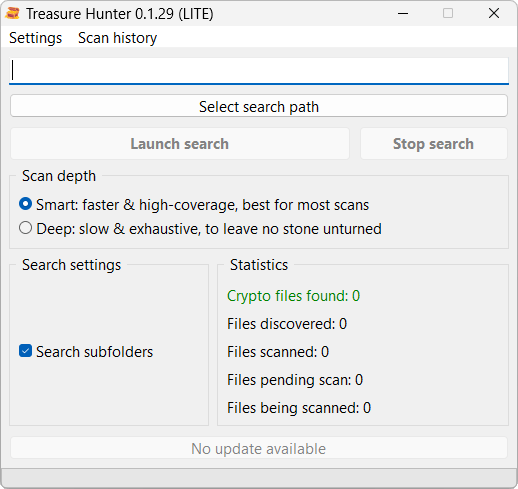
Once you have downloaded the software, open it. You will see the following window:
-
Click Select search path.
-
Select the drive you would like to scan.
-
Select your scan depth.
-
The smart scan is best for standard, healthy drives. It is faster and handles most scenarios perfectly.
-
The deep scan is best for complex cases. Use this option when:
-
You suspect wallet files were intentionally hidden.
-
You are scanning a reformatted, wiped, or damaged drive that was restored with data recovery software (like Disk Drill, DMDE, or R-Studio).
-
-
-
Click Launch search to begin the analysis.
Treasure Hunter will scan the selected path for Bitcoin wallets. This may take several hours to complete. Please be patient and allow the software to finish its work. Once it is done, it will let you know if any Bitcoin wallets have been detected.
How to manually search an old hard drive for Bitcoins
Another popular approach to tracking down lost Bitcoins is to search your hard drive for the presence of certain files or folders related to the wallet software you used. A Google search will let you know which files or folders you should be on the lookout for.
If you don’t know which wallet software you used, you will have to search for files and folders from programs that were popular at the time you bought your Bitcoins.
Common Bitcoin wallet files and folders to search for
It’s impossible to list every file or folder, but several wallet applications were particularly popular in the early 2010s.
First, open your operating system’s application data folder:
-
On Windows, it can be found at
C:\Users\<username>\AppData\RoamingorC:\Documents and Settings\<username>\Application Data. Alternatively, you may copy-paste%Appdata%into your File Explorer address bar. -
On Mac, it can be found at
/Users/<username>/Library/Application Support. Alternatively, you may pressShift + Command + Gin Finder and copy-paste~/Library/Application Supportinto the box.
Next, locate the folders below and, if they exist, search for the corresponding files or subfolders.
| Software | Folder to search | What to search inside the folder |
|---|---|---|
| Bitcoin Core (2009) | Bitcoin |
A wallet.dat file or a wallets folder. |
| Electrum (2011) | Electrum |
A wallets folder or an electrum.dat file. |
| Multibit Classic (2011) | MultiBit |
A .key, .wallet, or .wallet.cipher file. |
| Armory (2011) | Armory |
A .wallet file. |
| Multibit HD (2013) | MultiBitHD |
A .wallet.aes or .zip.aes file. |
| Bither (2014) | Bither |
An address.db file. |
| Coin Space (2015) | Coin Wallet |
.ldb or .log files. |
Alternatively, you can search your hard drive for filenames matching any of the following keywords:
wallet.datwallet.aes.json.wallet.wallet.cipherelectrum.datelectrum-private-keyswallet_keylist_
Finally, you can search your hard drive for cryptocurrency-related keywords such as:
bitcoinbtcwalletprivate keyseed phrasemnemonic phrasebackup phraserecovery phrasesecret phrase
I have found a Bitcoin wallet file; what do I do?
Congratulations! This is a major step forward.
Now that you have located a wallet file, the next step is to access the funds inside it. This is a broad topic with many pitfalls that deserves its own guide. As a rule of thumb, you should identify which wallet software generated the file. If you used Treasure Hunter, this should be indicated in the scan results. Then, you should try opening the wallet file with the appropriate software.
In the best-case scenario, the wallet software will grant you direct access to your funds or ask for a password you already know. If you aren’t so lucky, you might run into hurdles, like the software failing to recognize the wallet file or demanding an unknown password.
Frequently asked questions
Can Bitcoins be recovered from a reformatted, wiped, or damaged hard drive?
Yes, but your mileage may vary since the original data is likely to be corrupted. You will need to use data recovery software to reconstruct the drive’s filesystem, then search it manually or with an automated tool such as Treasure Hunter. To prevent further damage, avoid repeatedly recreating the drive’s filesystem. Instead, create a byte-to-byte backup – also called a disk image or clone –, which can be safely converted into a filesystem multiple times if necessary. Follow this in-depth tutorial for more details.
If I find Bitcoins on someone else’s computer, do they belong to me?
No. Simply finding Bitcoins does not grant ownership. Legal implications vary depending on how and where you discovered them, so it’s best to consult a lawyer.