Since its release in 2009, Bitcoin has evolved from a niche experiment into a global phenomenon. Many early adopters who mined or bought Bitcoins when they were worth virtually nothing eventually moved on, leaving their digital wealth sitting on old hardware that has been wiped or damaged.
If this sounds familiar, you may have already spent hours scouring old storage devices with data recovery software like
Disk Drill, DMDE, or R-Studio. Perhaps those efforts actually paid off when you located a wallet.dat file
from Bitcoin Core, a .key file from Multibit Classic, a wallet.aes.json file from Blockchain.com, or any
other “holy grail” file that contains your Bitcoins. However, the initial rush of discovery may have turned to dismay when
you attempted to access the wallet and were met with error messages such as:
Invalid passwordProvided AES key is wrongCannot load wallet (1): AssertionError()wallet.dat corrupt, salvage failedCould not decrypt bytesWallet file verification failed
Is it a forgotten password or a corrupt file?
In the case of password-protected wallets, it is entirely possible that your wallet file is intact and that you have simply forgotten a password set 10 or 15 years ago. Thus, if your wallet software isn’t specifically complaining about data corruption, it is worth considering if your password is indeed valid. It may feel like gaslighting, but we humans are terrible when it comes to remembering passwords.
That being said, when a wallet file is corrupt, the software cannot always distinguish between damaged data and an incorrect password. This is the unfortunate reality of using data recovery tools on wiped or failing drives: sometimes, they can only partially reconstruct your wallet file. In this scenario, your wallet software will fail to decrypt the file even if you provide the correct password.
Assessing the odds of success
If you are dealing with a corrupt wallet file – password-protected or otherwise – your primary concern is likely whether your Bitcoins can still be retrieved. The answer is yes, but your odds of success will depend on the extent of the corruption and where it is located within the wallet file. Each situation is unique.
In this article, I will walk you through a practical example of how to recover a corrupt wallet file. While I aim for clarity, this guide is technical by nature and assumes a baseline level of computer knowledge. Additionally, while the focus is on Bitcoin, this article is equally applicable to other cryptocurrencies like Ethereum, Litecoin, Dash, Dogecoin, and more.
How are Bitcoins stored?
Technically speaking, Bitcoins are not stored “on” your hard drive in the way a photo or a document is. Instead, what your computer actually holds is a secret, or a piece of data that authorizes you to move the associated funds by proving you are their rightful owner. Throughout this guide, I will refer to any file containing this secret as a wallet file.
While wallet files differ significantly in their internal structure, they generally fall into two categories: human-readable files accessible via text editors, and machine-readable files requiring specialized software to parse.
Fixing a corrupt wallet file: a case study
To understand how we can recover funds, we will examine a real-world scenario involving a Multibit Classic .key file
that is protected by a password. This format is ideal for a walkthrough because its internal structure is straightforward,
making it easier to troubleshoot than more complex, machine-readable wallet types.
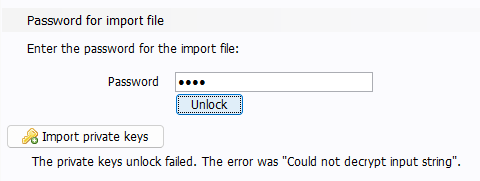
In this scenario, attempting to import the .key file into Multibit Classic results in the following error message, despite
the user knowing for certain that their password (test) is correct: The private keys unlock failed. The error was "Could not
decrypt input string".
Step 1: Analyzing the raw data
When we open the .key file in a text editor, we see the following:
1U2FsdGVkX18SvZ59mD7chMSmwq5+7HQAAxuAci.QxEWZMS577tV1NLTRZQF/iEl7kPHfIdNPhvov
23ofBEXiyPQLdWnplg7hkZwUDpw6y2P6Ev9rwzpoDjlcv+fNGNkXn
Technical knowledge is critical here, as there is no universal standard for creating a wallet file; its internal structure
will vary widely depending on many factors, such as which software generated it. For instance, a password-protected Multibit
Classic .key file is expected to start with U2FsdGVkX1 and be composed entirely of characters from the Base64 alphabet:
A B C D E F G H I J K L M N O P Q R S T U V W X Y Z a b c d e f g h i j k l m n o p q r s t u v w x y z 0 1 2 3 4 5 6 7 8 9 + /
Step 2: Spotting the data corruption
Now, look closely at our corrupt file again. Can you spot the problem?
Near the middle of the first line, there is a dot (.) character, which is not part of the Base64 alphabet. This is a
clear indicator of data corruption. While there could be other hidden errors, this invalid character is an obvious place
to start our repair process.
Step 3: Repairing the data corruption
We can try to fix the data corruption through character substitution. In other words, we will create variations of the
.key file where the . character is replaced by every possible character in the Base64 alphabet. Since there are 64
characters in the alphabet, we are going to generate 64 different versions of the .key file.
- In the first file, the
.character is replaced byA. - In the second file, the
.character is replaced byB. - In the third file, the
.character is replaced byC. - … and so on.
Step 4: Testing the .key files
At this stage, we can attempt to import each of the 64 .key files into Multibit Classic. The goal is to systematically
test valid Base64 characters until the software successfully recognizes the wallet file. In this example, the repair is
successful when the . character is replaced by a forward slash (/):
1U2FsdGVkX18SvZ59mD7chMSmwq5+7HQAAxuAci/QxEWZMS577tV1NLTRZQF/iEl7kPHfIdNPhvov
23ofBEXiyPQLdWnplg7hkZwUDpw6y2P6Ev9rwzpoDjlcv+fNGNkXn
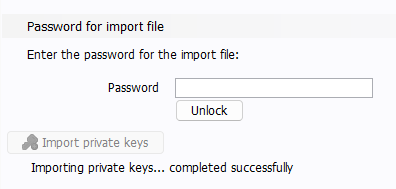
When the correct .key file is imported, Multibit Classic finally accepts the password test and returns the message:
Importing private keys... completed successfully. The funds are now accessible.
My professional recovery service
The example above illustrates a successful recovery involving a single corrupt character. Remember that I chose the
.key format from Multibit Classic because its simple structure allows for a clear walkthrough; in reality, data
corruption is often significantly more complex.
For instance, if we attempt to open a wallet.dat file from Bitcoin Core in a text editor, we will see nothing but a
wall of garbled, unintelligible characters. This is to be expected, since it is a machine-readable file meant to be
parsed with specialized software. To troubleshoot it, we must use a hex editor to analyze the underlying binary data,
which looks like this:
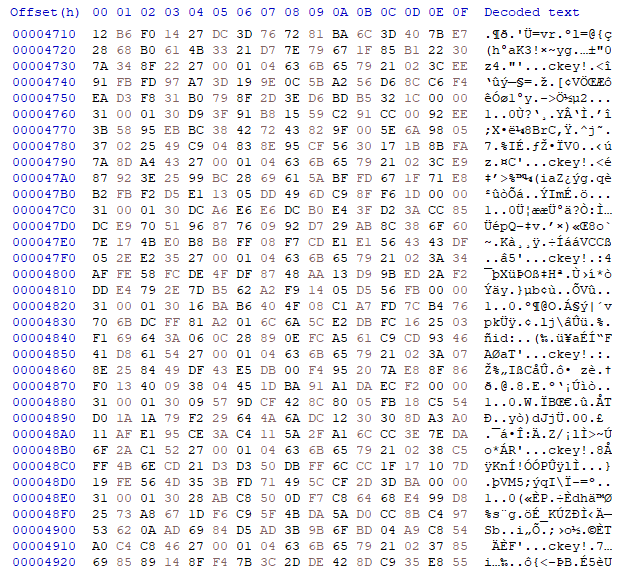
While a single error in a .key file is relatively easy to isolate, the structure of a wallet.dat file is another
ballgame. Because it is a machine-readable format composed of nested information, manual repairs are virtually impossible
without technical expertise.
This is why I offer a professional recovery service designed to handle corrupt cryptocurrency wallets. The technique outlined in this guide is a practical demonstration of the data surgery I perform when recovering wallet files. To make this accessible and risk-free for you, I operate on a success-only basis:
- I charge a fee of 15% on the recovered cryptocurrencies.
- I do not charge any hourly rates, flat fees, or upfront costs.
- If I am unable to recover your funds, you don’t pay anything.
If you suspect your wallet file might be corrupt, click the button below to get in touch with me. Let’s see if your digital wealth can be saved!